BigQuery is Google Cloud's data warehouse. You load tables into it, you query them in SQL, and you pay for the bytes each query reads. For someone who buys media, it is the one place where Google Ads, GA4 and your CRM can sit inside the same query.
That part is easy to say. The harder question is whether your account has anything to do in there, and most of the accounts I look at do not. Not yet.
A warehouse, not another dashboard
Your Google Ads interface answers the questions it was built to answer. Cost by campaign, conversions by device, search terms over the last few weeks. Those are prepared reports: someone decided in advance which rows you would want and how deep you could go.
Think of the dashboard on your car and the diagnostic port under the wheel. Same car, same sensors. The dashboard shows six numbers picked for you. The port gives every value the car records, at the rate it records them, including the ones no dial displays. Nobody plugs in a diagnostic tool to check the fuel level.
BigQuery is the port. It is one service inside Google Cloud, not Google Cloud itself: you open a Cloud project, and BigQuery is what you switch on inside it.
Underneath, the structure is small enough to hold in your head:
- Project: the billing and access container. Everything lives in one.
- Dataset: a folder inside that project, tied to a region you choose once.
- Table: the rows themselves, one line per event, per click, per order.
The language is SQL, the same one used by most databases. That matters more than it sounds: it means your data team already knows how to read your advertising data, and that you are not learning a tool that exists nowhere else.
What it is actually used for on an ad account
Four jobs come back on almost every account that ends up needing it.
- Joining sources. Ad spend on one side, closed deals on the other, matched on a click ID or an order ID. No interface does this, because no interface owns both sides.
- Keeping history. Platforms keep what they keep. A warehouse keeps what you decide to keep, for as long as you pay for the storage.
- Reading raw rows. GA4 aggregates in its reports. The export holds the event as it was received, with its parameters, before anything is grouped.
- Feeding a dashboard that does not time out. Looker Studio on a live API connector gets slow and quota-limited. On a table, it reads.
A number to make the volume concrete. I pulled the search terms of the fourteen accounts I manage over thirty days: 47,463 rows. One single account carries 32,895 of them, close to seven out of ten, and three accounts return nothing at all because they run no search traffic. That spread is the whole point. The same feature can be pointless on eleven accounts and structural on one.
How the data gets in
You will meet three doors, and they are not equally open.
GA4 has a native export. You link the property to a Cloud project, and events start landing in a daily table. The Analytics help center is clear on what you get: raw, unsampled event data, once a day, plus a streaming option that runs through the day. Standard properties are capped at one million events per day for the daily export, and a property that keeps going over gets its daily export paused. Worth knowing before a peak season, not during.
Google Ads has a transfer service. The BigQuery Data Transfer Service pulls your reports on a schedule, once every 24 hours at most, with a refresh window of seven days by default and thirty at the maximum. You can write your own reports in GAQL, with a catch that costs an afternoon if you discover it late: custom reports in that connector do not accept WHERE, ORDER BY, LIMIT or PARAMETERS. You filter after loading, not before.
Your CRM comes in by whatever route it has. A scheduled file, a connector, a script. This is usually the part that takes weeks, and it has nothing to do with BigQuery.
One detail decides more budgets than it should: on the pricing page, transfer orchestration is listed at no charge for Alphabet sources, which covers Google Ads, GA4, Merchant Center, Search Ads 360, Display & Video 360 and Campaign Manager. Facebook Ads sits in the paid list, billed on consumption. If your reporting is Meta-heavy, the free part of this story is smaller than the demo suggested.
What it costs, and what actually costs
Two meters run. Storage, billed per gibibyte per month. Compute, billed on the bytes your queries read, not on the rows they return.
The free tier covers more than most advertisers expect: the first tebibyte of query data processed each month is free, and so are the first ten gibibytes of active storage. A year of Google Ads reports for a mid-size account fits in that storage without a fight.
Which means the bill almost never comes from the data you keep. It comes from how you ask. A SELECT * on a wide table reads every column you did not need, every time it runs, and a dashboard that refreshes it fifty times a day multiplies that by fifty. Name your columns, filter on the partition date, and the same work costs a fraction.
The rule I would keep: storage is cheap, questions are what you pay for.
Starting without a credit card
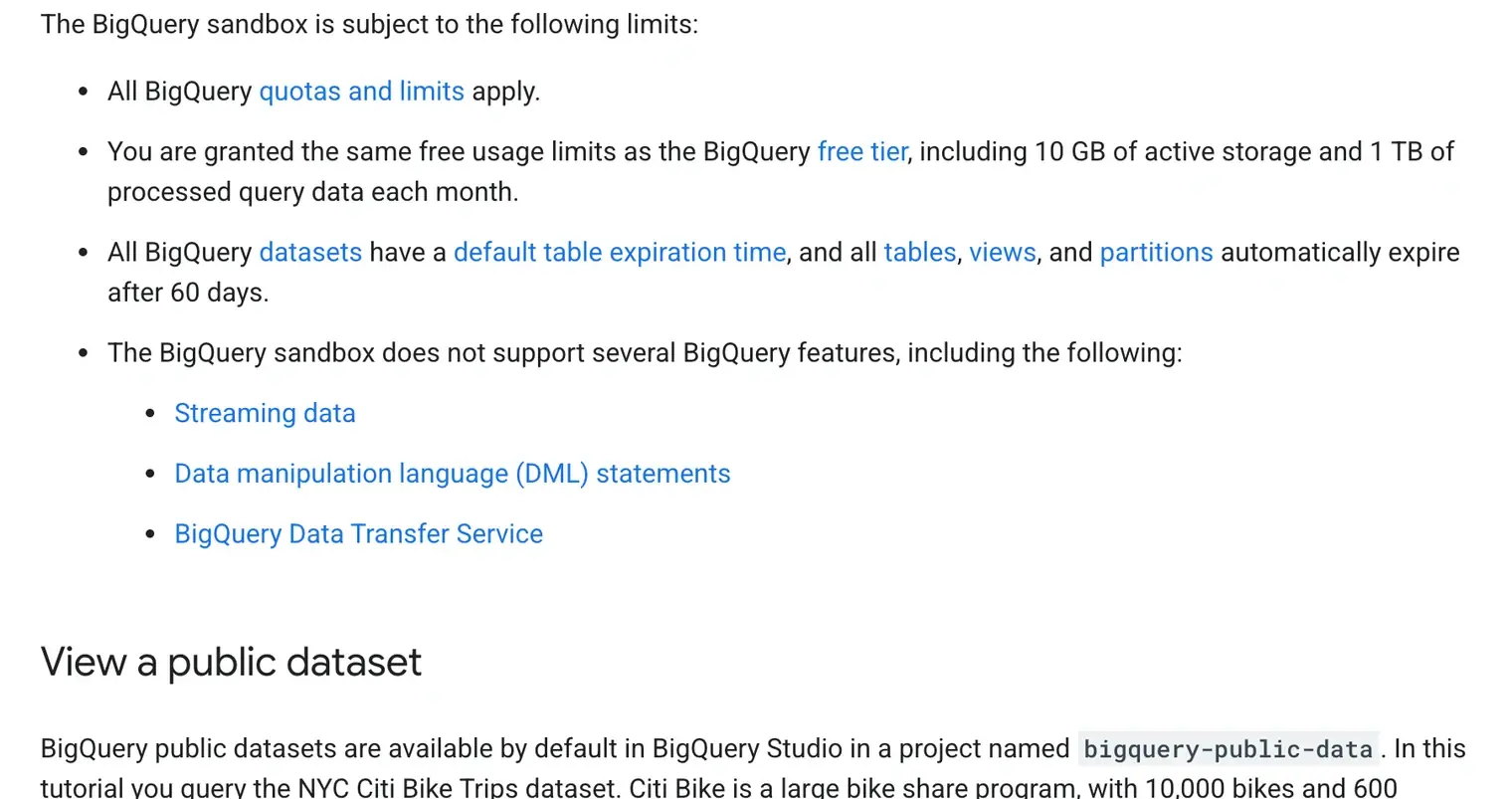
The BigQuery sandbox lets you load tables and run queries with no billing account attached. Same free limits as above, and it is the honest way to find out whether you have a real use case before anyone signs anything.
Read the limits before you build on it, because two of them bite. Tables, views and partitions expire automatically after 60 days, and the sandbox does not support the Data Transfer Service, streaming, or DML statements. So the sandbox is where you test a query on a GA4 export. It is not where you set up your Google Ads pipeline.
If you want a first useful move that costs nothing and takes ten minutes: link your GA4 property to a Cloud project and switch the daily export on. Data starts flowing within 24 hours of the link, and each day brings the previous day's file. The history you are not collecting today is the one you will want in eight months.
The part that surprises people: models live inside it
BigQuery ML lets you create and run machine learning models with the same SQL you use to query, and the model is stored in your dataset next to your tables. Nothing leaves the warehouse, and nobody has to build a pipeline to a separate tool.
For an advertiser, that opens a door that used to be closed without a data team: scoring which leads look like the ones that closed, forecasting a seasonal curve on your own history, grouping customers by behaviour before you build an audience. I would keep expectations calm here. A model built on a thin, badly tracked dataset produces confident nonsense, and the accounts that most want this are often the ones whose conversion data is not ready for it.
The limits nobody mentions in the demo
None of this is a reason to skip BigQuery. It is a reason to know what you are signing up for.
- Yesterday, not now. The daily export lands mid-afternoon for the previous day. For anything live, you stay in the platform interface.
- The million-event ceiling. Standard GA4 properties stop their daily export if they consistently exceed it. High-traffic sites hit this and only find out when a table goes missing.
- Someone has to write the SQL. The warehouse answers questions; it does not have any of its own. An account with no analyst gets a very expensive empty room.
- It measures, it does not act. Nothing you compute in BigQuery reaches your campaigns unless you send it back, and that is a different project entirely. I wrote about the version of it Google opened this year, where Google Ads reads a BigQuery table to feed a conversion action, and the entry conditions are strict.
When you do not need it
I will take the position most vendor pages avoid: if your question fits in a report, the report wins. It is faster, it is free, and it is already in front of you.
BigQuery starts making sense when one of these is true on your account:
- You need spend and revenue in the same row, and revenue lives in a system Google never sees.
- You need history that goes beyond what the platform keeps for you.
- You are already exporting to spreadsheets that break, freeze, or get manually re-pasted every month.
- Someone on your side can write SQL, or you are ready to pay for that skill.
None of them true? Then the honest answer is that your reporting problem is not a storage problem, and a warehouse will not fix a conversion action that was never set up properly. That is tracking work, and it comes first.
Three questions I get every time
Is BigQuery a SQL database? It runs SQL, but it is a warehouse built for analysis, not an application database. You query large volumes fast; you do not use it to serve your website.
How much does it cost per month? For a single advertising account exporting Google Ads and GA4, storage usually stays inside the free ten gibibytes for a long time, and the queries stay inside the free tebibyte unless a dashboard is refreshing badly. The bill grows with the number of people querying, not with the number of campaigns you run.
Is it the same thing as Snowflake? Same job, different economics. Both store your rows and answer SQL. BigQuery bills the bytes your queries read and needs no cluster to size; Snowflake bills the compute you keep running. For an advertiser already inside the Google ecosystem, the deciding factor is rarely the engine, it is that GA4 and Google Ads pour into BigQuery natively and into everything else through a connector you maintain.
Before you open a Cloud project, the useful move is to look at what your conversions actually record, line by line. That is the arbitration I run in an account audit before touching anything on a Google Ads account.